<?xml version="1.0" encoding="UTF-8"?>
<feed xmlns="http://www.w3.org/2005/Atom">
  <title><![CDATA[Steamshift Labs]]></title>
  <subtitle><![CDATA[Stuff we're doing, stuff we've seen, stuff we like.]]></subtitle>
  <link href="http://labs.steamshift.com/atom.xml" rel="self"/>
  <link href="http://labs.steamshift.com"/>
  <updated>2013-12-11T18:30:39.535Z</updated>
  <id>http://labs.steamshift.com/</id>
  <author>
    <name><![CDATA[Brothers Bennett]]></name>
  </author>
  <generator uri="http://zespia.tw/hexo">Hexo</generator>
  <entry>
    <title type="html"><![CDATA[The Airman]]></title>
    <link href="http://labs.steamshift.com/blog/2013/12/11/the-airman/"/>
    <id>http://labs.steamshift.com/blog/2013/12/11/the-airman/</id>
    <published>2013-12-11T18:21:43.000Z</published>
    <updated>2013-12-11T18:29:22.000Z</updated>
    <content type="html"><![CDATA[<p>Andy went along to <a href="http://london.musichackday.org/2013/index.php?page=Main+page" target="_blank">Music Hack Day, London</a>. Here‘s the result of that weekend’s hacking.</p>
<h3>The Airman</h3>
<p>Generative audio from found 16mm film.</p>
<p>Projecting the found footage of “The Airman” using a scratch built film projector (created using a few parts from a defunct projector, 3d printed parts and threaded rod).</p>
<p>The film is projected onto a small screen and captured by a USB webcam feeding into Quartz Composer to process the footage and then capture pixel values, which are then passed by midi to Pure Data.</p>
<p>The PD sketch was created by <a href="http://www.martin-brinkmann.de/" target="_blank">Martin Brinkmann</a>, and adapted to accept the passed midi controller values to adjust the sounds being created.</p>
<p>In future, I hope to get the film sync&#39;d with a strobing light source, to produce a still image; and to construct a PD (or similar) sketch from scratch to generate the music.</p>
<div class="video-container"><iframe src="//www.youtube.com/embed/SslcI1SK7is" frameborder="0" allowfullscreen></iframe></div>
]]></content>
    <category scheme="http://labs.steamshift.com/categories/3D Printing/" term="3D Printing"/>
    <category scheme="http://labs.steamshift.com/categories/3D Printing/16mm Film/" term="16mm Film"/>
    <category scheme="http://labs.steamshift.com/categories/3D Printing/16mm Film/Hack/" term="Hack"/>
    <category scheme="http://labs.steamshift.com/categories/3D Printing/16mm Film/Hack/Art/" term="Art"/>
  </entry>
  <entry>
    <title type="html"><![CDATA[Thingiverse page]]></title>
    <link href="http://labs.steamshift.com/blog/2013/11/09/thingiverse-page/"/>
    <id>http://labs.steamshift.com/blog/2013/11/09/thingiverse-page/</id>
    <published>2013-11-09T13:18:09.000Z</published>
    <updated>2013-11-09T13:21:16.000Z</updated>
    <content type="html"><![CDATA[<p>Quick post to point at <a href="http://www.thingiverse.com/akbsteam" target="_blank">Andy&#39;s Thingiverse profile</a>; bits and bobs we&#39;ve designed for 3d printing.</p>
]]></content>
    <category scheme="http://labs.steamshift.com/categories/3d Printing/" term="3d Printing"/>
    <category scheme="http://labs.steamshift.com/categories/3d Printing/Thingiverse/" term="Thingiverse"/>
  </entry>
  <entry>
    <title type="html"><![CDATA[Virus: A game using iBeacons]]></title>
    <link href="http://labs.steamshift.com/blog/2013/10/29/virus-a-game-using-ibeacons/"/>
    <id>http://labs.steamshift.com/blog/2013/10/29/virus-a-game-using-ibeacons/</id>
    <published>2013-10-29T12:45:36.000Z</published>
    <updated>2013-11-05T12:20:56.000Z</updated>
    <content type="html"><![CDATA[<p><a href="http://overtheair.org" target="_blank">Over the Air</a> this year saw Andy join forces with Simon and Steven of <a href="http://www.theboffinlab.com" target="_blank">the Boffin Lab</a> and <a href="http://www.padajo.com" target="_blank">Paul Johnston</a>  to do “something involving iBeacons”!</p>
<p>We very quickly decided that the advertised uses of the technology (retail, museums etc) weren&#39;t very interesting and we should build a game instead. iBeacons allow you to use proximity to either standalone beacons (e.g. <a href="http://estimote.com" target="_blank">Estimote</a>), or to other devices that support the profile (later iOS devices running iOS7). </p>
<p>The idea that emerged was game based on viruses, where the aim was to infect everyone else without being infected yourself. The game mechanic would be (for extra geek points) <a href="http://en.wikipedia.org/wiki/Rock-paper-scissors-lizard-Spock" target="_blank">Rock-Paper-Scissors-Lizard-Spock</a>, where when coming into close proximity with another player, you would have to choose one of your viruses to play against them with, and then fight for who infects who.</p>
<p>iBeacons in the end turned out to be harder to get working reliably than we‘d first anticipated and are very slow to recognise the change in proximity (probably due to limitations or configuration of the underlying Bluetooth LE system). However, we presented the game and won the ’Hardware - Best use of other features prize&#39;! 👍</p>
<p>iBeacons are definitely something Steamshift will be revisiting in the future.</p>
]]></content>
    <category scheme="http://labs.steamshift.com/categories/iOS/" term="iOS"/>
    <category scheme="http://labs.steamshift.com/categories/iOS/iBeacons/" term="iBeacons"/>
    <category scheme="http://labs.steamshift.com/categories/iOS/iBeacons/Game/" term="Game"/>
  </entry>
  <entry>
    <title type="html"><![CDATA[Hacklet #18 - Brewswitch in action!]]></title>
    <link href="http://labs.steamshift.com/blog/2013/07/05/hacklet-number-18-brewswitch-in-action/"/>
    <id>http://labs.steamshift.com/blog/2013/07/05/hacklet-number-18-brewswitch-in-action/</id>
    <published>2013-07-05T19:24:00.000Z</published>
    <updated>2013-07-23T19:47:26.000Z</updated>
    <content type="html"><![CDATA[<div class="video-container"><iframe src="//player.vimeo.com/video/70887305" frameborder="0" allowfullscreen></iframe></div>
]]></content>
  </entry>
  <entry>
    <title type="html"><![CDATA[Hacklet #17 - Brewswitch; problems and solutions]]></title>
    <link href="http://labs.steamshift.com/blog/2013/07/01/hacklet-number-17-brewswitch-problems-and-solutions/"/>
    <id>http://labs.steamshift.com/blog/2013/07/01/hacklet-number-17-brewswitch-problems-and-solutions/</id>
    <published>2013-07-01T19:04:00.000Z</published>
    <updated>2013-07-23T19:34:39.000Z</updated>
    <content type="html"><![CDATA[<p>The brewswitch boards weren&#39;t totally right; no major issues but not where I want them to be.</p>
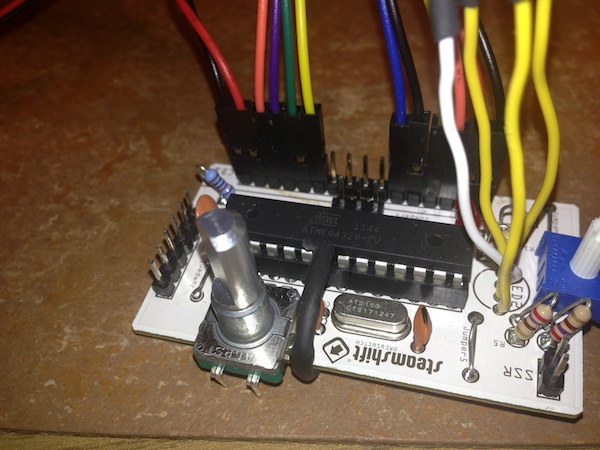
<p>First up, I didn&#39;t take advantage of the fact that Fritzing manufactured boards can have tracks on either side; meaning that I ended up with a number of jumpers. Not a major issue, but more stuff to solder up.</p>
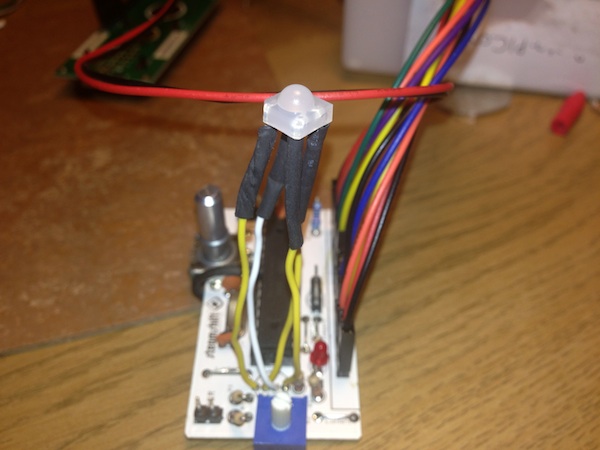
<p>The 2nd issue is that I&#39;d just used an RGB Led from Fritzing and not checked whether it was common anode or cathode. Turns out my board needs a common anode, and the LEDs I bought were common cathode. So in the interests of getting a board working, I found a common anode LED and soldered it up with long wire legs so it would fit.</p>
<p><img src="/images/posts/brewswitch_led_bodge.jpg" alt="Brewswitch Mk2"></p>
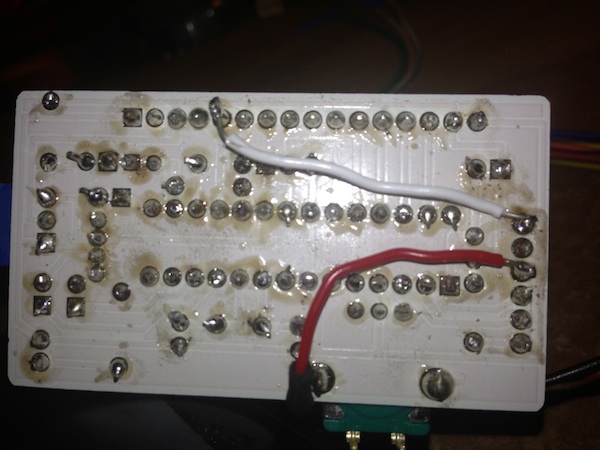
<p>3rd up, OOPS! I managed in the design to connect GND and +V on the Atmega chip. A little creative soldering and that was resolved too!</p>
<p><img src="/images/posts/atmega_bodge.jpg" alt="Brewswitch Mk2"></p>
<p>The 4th issue was that I missed that the LCD required a link to ground from pin 5. Again, no problem with a bit of wiring.</p>
<p><img src="/images/posts/atmega_bodge2.jpg" alt="Brewswitch Mk2"></p>
<p>And finally, I found that I&#39;d forgotten to put a resistor connecting the data pin of the temperature to +5v. I wired that in line, and off we went.</p>
<p>All of these issues will be rectified in the next version of the boards, but considering its my first crack at getting something made, I&#39;m pretty pleased with the results. Especially as it does actually work!</p>
]]></content>
  </entry>
  <entry>
    <title type="html"><![CDATA[Hacklet #16 - Brewswitch; first boards]]></title>
    <link href="http://labs.steamshift.com/blog/2013/06/23/hacklet-number-16-brewswitch-first-boards/"/>
    <id>http://labs.steamshift.com/blog/2013/06/23/hacklet-number-16-brewswitch-first-boards/</id>
    <published>2013-06-23T19:02:00.000Z</published>
    <updated>2013-07-23T19:11:55.000Z</updated>
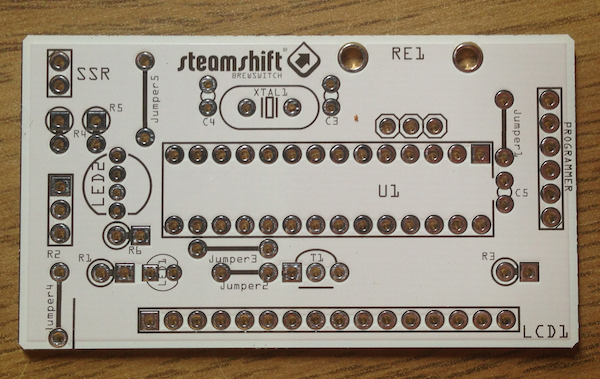
    <content type="html"><![CDATA[<p>I had 5 of the brewswitch boards manufactured by Fritzing. They turned up and look great:-</p>
<p><img src="/images/posts/brewswitch1_pcb.png" alt="Brewswitch Mk2"></p>
<p>Next job, solder one up and see how it works!</p>
]]></content>
  </entry>
  <entry>
    <title type="html"><![CDATA[Beginning 3D printing #1]]></title>
    <link href="http://labs.steamshift.com/blog/2013/05/20/beginning-3d-printing-number-1/"/>
    <id>http://labs.steamshift.com/blog/2013/05/20/beginning-3d-printing-number-1/</id>
    <published>2013-05-20T09:40:00.000Z</published>
    <updated>2013-05-20T09:56:22.000Z</updated>
    <content type="html"><![CDATA[<p>Big up to <a href="http://www.somakeit.org.uk" target="_blank">SoMakeIt</a> - the Southampton maker space; if you&#39;re in this part of the world and into making, you need to get yourself along!</p>
<p>As much as I would have loved to go to WWDC this year, I decided that if I had a couple of grand spare (haha!) or perhaps rather less, that I would rather spend it on being part of the maker revolution - hence the <a href="http://www.makerslideeurope.com/eshapeoko-mechanical-kit.html" target="_blank">eShapeOko</a> <a href="/blog/2013/04/30/eshapeoko-its-alive/">post</a> from the other day; and now 3d printing.</p>
<p>As a first foray into this field, I&#39;m lucky enough as a member of SoMakeIt to have access to the 3D printer that member Chris has lent to the space (in part in thanks for all the expertise from Bracken and others that has helped get it running). I figured that a good place to start (apart from the inevitable Minecraft stuff that my son would undoubtedly like me to print) would be a few bits for the eShapeOko.</p>
<p>Thanks to <a href="http://www.thingiverse.com" target="_blank">Thingiverse</a> I was able to find this <a href="http://www.thingiverse.com/thing:11978" target="_blank">cable chain</a> which looks ideal for keeping the router&#39;s cables out of the way whilst its moving, a <a href="http://www.thingiverse.com/thing:47696" target="_blank">series of pen holders</a> and an <a href="http://www.thingiverse.com/thing:67421" target="_blank">Arduino (Uno) Altoids Insert</a>.</p>
<p>In terms of software, we need <a href="http://slic3r.org/download" target="_blank">Slic3r</a> and <a href="https://github.com/kliment/Printrun" target="_blank">Printrun</a>; I&#39;m running these jobs using a mac so needed the Mac binary of Printrun available <a href="http://koti.kapsi.fi/%7Ekliment/printrun/" target="_blank">here</a>.</p>
<p>And thanks to standing on the shoulders of those who&#39;ve been there before I was able to get Slic3r configured using a config file pre-prepared for the SoMakeIt 3d-printer.</p>
<p>Starting with the simplest model - the Arduino altoids insert - I downloaded the .stl file, imported it into the configured slic3r app and exported the GCode.</p>
<p>With that I was ready to import into Pronterface and do my print! (Next time I&#39;ll cover the printing itself)</p>
]]></content>
    <category scheme="http://labs.steamshift.com/categories/makerspace/" term="makerspace"/>
    <category scheme="http://labs.steamshift.com/categories/makerspace/somakeit/" term="somakeit"/>
    <category scheme="http://labs.steamshift.com/categories/makerspace/somakeit/3D printing/" term="3D printing"/>
  </entry>
  <entry>
    <title type="html"><![CDATA[Hacklet #15 - BrewSwitch Mk2]]></title>
    <link href="http://labs.steamshift.com/blog/2013/05/15/hacklet-number-15-brewswitch-mk2/"/>
    <id>http://labs.steamshift.com/blog/2013/05/15/hacklet-number-15-brewswitch-mk2/</id>
    <published>2013-05-15T20:54:00.000Z</published>
    <updated>2013-05-16T10:16:18.000Z</updated>
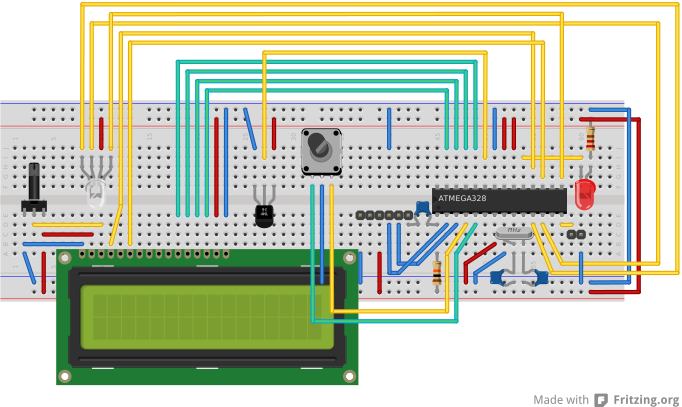
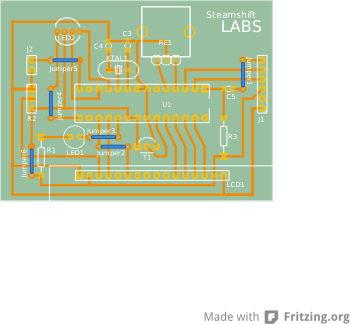
    <content type="html"><![CDATA[<p>This hacklet consists of a couple of images from my time playing with <a href="http://fritzing.org" target="_blank">Fritzing</a> to design the next iteration of the Brew Temperature Switch.</p>
<p>So, here is BrewSwitch Mk2 (breadboard version):</p>
<p><img src="/images/posts/brewswitch_bb.svg" alt="Brewswitch Mk2"></p>
<p>and here is the PCB:</p>
<p><img src="/images/posts/brewswitch_pcb.svg" alt="Brewswitch Mk2"></p>
]]></content>
    <category scheme="http://labs.steamshift.com/categories/arduino/" term="arduino"/>
    <category scheme="http://labs.steamshift.com/categories/arduino/beer/" term="beer"/>
    <category scheme="http://labs.steamshift.com/categories/arduino/beer/brewing/" term="brewing"/>
    <category scheme="http://labs.steamshift.com/categories/arduino/beer/brewing/brewswitch/" term="brewswitch"/>
  </entry>
  <entry>
    <title type="html"><![CDATA[Hacklet #14 - Arduino and RPi sitting in a tree ...]]></title>
    <link href="http://labs.steamshift.com/blog/2013/05/03/hacklet-number-14-arduino-and-rpi-sitting-in-a-tree-dot-dot-dot/"/>
    <id>http://labs.steamshift.com/blog/2013/05/03/hacklet-number-14-arduino-and-rpi-sitting-in-a-tree-dot-dot-dot/</id>
    <published>2013-05-03T17:36:00.000Z</published>
    <updated>2013-05-03T12:10:20.000Z</updated>
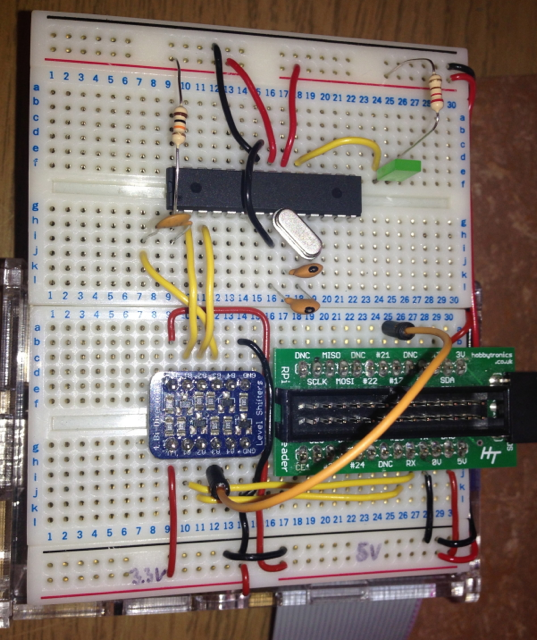
    <content type="html"><![CDATA[<p>The next hacklet is getting arduino and raspberry pi working together. </p>
<p>First up, I found that my Atmega chip was unflashed, so I needed to burn the bootloader <a href="http://www.instructables.com/id/Burning-the-Bootloader-on-ATMega328-using-Arduino-/" target="_blank">this tutorial</a> made it very easy!</p>
<p>Then I used this tutorial for <a href="http://www.deanmao.com/2012/08/06/arduino-and-the-raspberry-pi/" target="_blank">setting up the software</a> and then using a combination of this <a href="http://log.liminastudio.com/itp/physical-computing/breadboard-arduino-fast-cheap-and-fun" target="_blank">breadboard arduino tutorial</a>, and the photo from the <a href="http://www.deanmao.com/2012/08/10/uploading-sketches-to-the-arduino-on-the-pi/" target="_blank">follow up</a> from the initial tutorial.</p>
<p>However, the bit that neither tutorial mentioned, but in retrospect should have been obvious was connecting power to the logic-level converter.</p>
<p>So, here&#39;s what I ended up with:</p>
<img src="/images/posts/20130503-arduino-and-pi.png" width="300">
]]></content>
    <category scheme="http://labs.steamshift.com/categories/arduino/" term="arduino"/>
    <category scheme="http://labs.steamshift.com/categories/arduino/raspberry pi/" term="raspberry pi"/>
    <category scheme="http://labs.steamshift.com/categories/arduino/raspberry pi/serial/" term="serial"/>
  </entry>
  <entry>
    <title type="html"><![CDATA[eShapeoko - its alive!]]></title>
    <link href="http://labs.steamshift.com/blog/2013/04/30/eshapeoko-its-alive/"/>
    <id>http://labs.steamshift.com/blog/2013/04/30/eshapeoko-its-alive/</id>
    <published>2013-04-30T18:19:00.000Z</published>
    <updated>2013-04-30T18:26:41.000Z</updated>
    <content type="html"><![CDATA[<div class="video-container"><iframe src="//player.vimeo.com/video/65165684" frameborder="0" allowfullscreen></iframe></div>
]]></content>
    <category scheme="http://labs.steamshift.com/categories/cnc router/" term="cnc router"/>
    <category scheme="http://labs.steamshift.com/categories/cnc router/eshapeoko/" term="eshapeoko"/>
  </entry>
  <entry>
    <title type="html"><![CDATA[Hacklet #13 - Brew Temp Switch]]></title>
    <link href="http://labs.steamshift.com/blog/2013/03/27/hacklet-number-13-brew-temp-switch/"/>
    <id>http://labs.steamshift.com/blog/2013/03/27/hacklet-number-13-brew-temp-switch/</id>
    <published>2013-03-27T16:27:00.000Z</published>
    <updated>2013-05-16T10:16:21.000Z</updated>
    <content type="html"><![CDATA[<p>A couple of months ago, I tried my hand at home-brewing for the first time; and while the result was drinkable, it was fairly weak. As far as I can tell, the primary issue is that the first fermentation process needs to happen at a constant warm temperature (in the 21 - 27°C range) - my kitchen however, is more like 17-19°C.</p>
<p>I found a a neat product called <a href="http://www.brewuk.co.uk/store/brew-belt-universal-usage.html" target="_blank">a brew belt</a> designed for exactly such a scenario. Depending on the outside temperature, you place the belt on your fermentation vessel at different heights to ensure it warms it the right amount. Trouble is, that my kitchen isn‘t always a certain temperature … and I didn’t really want to keep checking the temperature and moving the belt. If only there was a way of switching the belt on and off depending on the actual temperature of the brew…</p>
<p>Inspired by the (vastly more elaborate) <a href="http://brewpi.com" target="_blank">brewpi</a> project, I&#39;ve rigged up an arduino, connected to a wired thermometer which can (safely) swich the brew belt on or off depending on the temperature of the brew.</p>
<p>Building on <a href="/blog/2013/03/09/hacklet-number-12-rotary-encoder-and-lcd-screen/">Hacklet #12</a>, adding a <a href="http://www.skpang.co.uk/catalog/temperature-sensor-waterproof-ds18b20-p-1059.html" target="_blank">waterproofed version</a> of the DS18B20 one wire thermometer using <a href="http://bildr.org/2011/07/ds18b20-arduino/" target="_blank">this handy tutorial</a> and connecting a cheap Maplins <a href="http://www.maplin.co.uk/remote-controlled-mains-socket-set-531547" target="_blank">remote controlled mains switch</a> and a <a href="http://blog.sui.li/2011/04/12/163/" target="_blank">tutorial</a> for hacking that, I now have myself an automatic brew temperature switch.</p>
<p>Using the RC switch means that the mains power is completely isolated from the arduino etc.</p>
<p>So, all that remains is to test out how well it works!</p>
<div class="video-container"><iframe src="//player.vimeo.com/video/62797656" frameborder="0" allowfullscreen></iframe></div>


<p>Read on for the arduino code …</p>
<p><a id="more"></a></p>
<script src="https://gist.github.com/5255895.js"></script>
]]></content>
    <category scheme="http://labs.steamshift.com/categories/hacklets/" term="hacklets"/>
    <category scheme="http://labs.steamshift.com/categories/hacklets/rotary encoder/" term="rotary encoder"/>
    <category scheme="http://labs.steamshift.com/categories/hacklets/rotary encoder/lcd/" term="lcd"/>
    <category scheme="http://labs.steamshift.com/categories/hacklets/rotary encoder/lcd/arduino/" term="arduino"/>
    <category scheme="http://labs.steamshift.com/categories/hacklets/rotary encoder/lcd/arduino/thermometer/" term="thermometer"/>
    <category scheme="http://labs.steamshift.com/categories/hacklets/rotary encoder/lcd/arduino/thermometer/rc switch/" term="rc switch"/>
    <category scheme="http://labs.steamshift.com/categories/hacklets/rotary encoder/lcd/arduino/thermometer/rc switch/brewswitch/" term="brewswitch"/>
  </entry>
  <entry>
    <title type="html"><![CDATA[Hacklet #10 - Robobear MkII - continued]]></title>
    <link href="http://labs.steamshift.com/blog/2013/03/18/hacklet-number-10-robobear-mkii-continued/"/>
    <id>http://labs.steamshift.com/blog/2013/03/18/hacklet-number-10-robobear-mkii-continued/</id>
    <published>2013-03-18T13:25:00.000Z</published>
    <updated>2013-03-18T13:27:20.000Z</updated>
    <content type="html"><![CDATA[<p>A very quick update to <a href="/blog/2013/03/06/hacklet-number-10-robobear-mkii/">Robobear MkII</a>, just because the last code example for the bear was so horrible; here&#39;s an OOP version.</p>
<script src="https://gist.github.com/5187102.js"></script>
]]></content>
    <category scheme="http://labs.steamshift.com/categories/raspberry pi/" term="raspberry pi"/>
    <category scheme="http://labs.steamshift.com/categories/raspberry pi/animatronics/" term="animatronics"/>
    <category scheme="http://labs.steamshift.com/categories/raspberry pi/animatronics/hacklet/" term="hacklet"/>
    <category scheme="http://labs.steamshift.com/categories/raspberry pi/animatronics/hacklet/pwm/" term="pwm"/>
    <category scheme="http://labs.steamshift.com/categories/raspberry pi/animatronics/hacklet/pwm/robobear/" term="robobear"/>
  </entry>
  <entry>
    <title type="html"><![CDATA[Hacklet #12 - Rotary Encoder and LCD Screen]]></title>
    <link href="http://labs.steamshift.com/blog/2013/03/09/hacklet-number-12-rotary-encoder-and-lcd-screen/"/>
    <id>http://labs.steamshift.com/blog/2013/03/09/hacklet-number-12-rotary-encoder-and-lcd-screen/</id>
    <published>2013-03-09T10:00:00.000Z</published>
    <updated>2013-03-08T19:21:41.000Z</updated>
    <content type="html"><![CDATA[<p>Based on <a href="http://bildr.org/2012/08/rotary-encoder-arduino/" target="_blank">this tutorial</a> for getting a rotary encoder working with arduino, and <a href="http://www.arduino.cc/playground/Code/LCD4BitLibrary" target="_blank">this old LCD library</a>, we now have a method for adjusting numerical data up/down using the rotary encoder, and displaying that data on the LCD screen.</p>
<div class="video-container"><iframe src="//player.vimeo.com/video/61368984" frameborder="0" allowfullscreen></iframe></div>


<p>Hmmm, I wonder what we could use that for…?!</p>
<p><a id="more"></a></p>
<script src="https://gist.github.com/5118599.js"></script>
]]></content>
    <category scheme="http://labs.steamshift.com/categories/hacklets/" term="hacklets"/>
    <category scheme="http://labs.steamshift.com/categories/hacklets/rotary encoder/" term="rotary encoder"/>
    <category scheme="http://labs.steamshift.com/categories/hacklets/rotary encoder/lcd/" term="lcd"/>
  </entry>
  <entry>
    <title type="html"><![CDATA[Hacklet #11 - Bluetooth LE Temperature Meter]]></title>
    <link href="http://labs.steamshift.com/blog/2013/03/08/hacklet-number-11-bluetooth-le-temperature-meter/"/>
    <id>http://labs.steamshift.com/blog/2013/03/08/hacklet-number-11-bluetooth-le-temperature-meter/</id>
    <published>2013-03-08T12:30:00.000Z</published>
    <updated>2013-03-08T18:21:08.000Z</updated>
    <content type="html"><![CDATA[<p>I combined <a href="http://www.mkroll.mobi/?p=593" target="_blank">this tutorial</a> and <a href="http://bildr.org/2011/01/tmp102-arduino/" target="_blank">this one</a>, to create a simple arduino based sensor which reports the temperature to a bluetooth 4.0 enabled mobile phone (in this case iPhone 5).</p>
<div class="video-container"><iframe src="//player.vimeo.com/video/61341476" frameborder="0" allowfullscreen></iframe></div>


<p><a id="more"></a><br>Here is the final arduino code (I&#39;m currently using Michael Krolls <a href="https://itunes.apple.com/ch/app/blexplr/id524018027?l=en&amp;mt=8&amp;ls=1" target="_blank">BLExplr</a> for testing)</p>
<script src="https://gist.github.com/5116125.js"></script>
]]></content>
    <category scheme="http://labs.steamshift.com/categories/hacklets/" term="hacklets"/>
    <category scheme="http://labs.steamshift.com/categories/hacklets/temperature/" term="temperature"/>
    <category scheme="http://labs.steamshift.com/categories/hacklets/temperature/arduino/" term="arduino"/>
    <category scheme="http://labs.steamshift.com/categories/hacklets/temperature/arduino/bluetooth/" term="bluetooth"/>
  </entry>
  <entry>
    <title type="html"><![CDATA[Hacklet #10 - RoboBear mkII]]></title>
    <link href="http://labs.steamshift.com/blog/2013/03/06/hacklet-number-10-robobear-mkii/"/>
    <id>http://labs.steamshift.com/blog/2013/03/06/hacklet-number-10-robobear-mkii/</id>
    <published>2013-03-06T21:50:00.000Z</published>
    <updated>2013-03-06T22:14:14.000Z</updated>
    <content type="html"><![CDATA[<p>In this iteration, RoboBear has had the Arduino microcontroller replaced with Raspberry Pi and an <a href="http://www.adafruit.com/products/815" target="_blank">Adafruit 16-Channel 12-bit PWM/Servo Driver</a>. There are several advantages to this setup; not least, is that I can control the bear using bluetooth or wifi (via SSH or HTTP), and therefore can hook him up to web services! For now though, he&#39;s just running a simple loop.</p>
<div class="video-container"><iframe src="//player.vimeo.com/video/61217270" frameborder="0" allowfullscreen></iframe></div>


<p><a id="more"></a><br>I found <a href="http://www.raspberrypi.org/phpBB3/viewtopic.php?t=32826&amp;p=281767" target="_blank">this tutorial</a> and the one one <a href="http://learn.adafruit.com/adafruit-16-channel-servo-driver-with-raspberry-pi/overview" target="_blank">learn.adafruit.com</a> very useful to get it started.</p>
<p>Here is the code; I know its horrible (really really bad); I&#39;m worrying about hardware not learning python for now! I&#39;ll clean it up before I do any more :)</p>
<script src="https://gist.github.com/5103492.js"></script>
]]></content>
    <category scheme="http://labs.steamshift.com/categories/raspberry pi/" term="raspberry pi"/>
    <category scheme="http://labs.steamshift.com/categories/raspberry pi/animatronics/" term="animatronics"/>
    <category scheme="http://labs.steamshift.com/categories/raspberry pi/animatronics/hacklet/" term="hacklet"/>
    <category scheme="http://labs.steamshift.com/categories/raspberry pi/animatronics/hacklet/pwm/" term="pwm"/>
    <category scheme="http://labs.steamshift.com/categories/raspberry pi/animatronics/hacklet/pwm/robobear/" term="robobear"/>
  </entry>
  <entry>
    <title type="html"><![CDATA[Hacklet #9 - RoboBear mk I]]></title>
    <link href="http://labs.steamshift.com/blog/2013/03/03/hacklet-number-9-robobear-mk-i/"/>
    <id>http://labs.steamshift.com/blog/2013/03/03/hacklet-number-9-robobear-mk-i/</id>
    <published>2013-03-03T16:18:00.000Z</published>
    <updated>2013-03-06T22:13:35.000Z</updated>
    <content type="html"><![CDATA[<p>After a work related hiatus in February from doing hacklets, we&#39;re back with the first for March, and its a good start to the month.</p>
<p>Without further ado, I give you RoboBear (Mk I):-</p>
<div class="video-container"><iframe src="//player.vimeo.com/video/60858701" frameborder="0" allowfullscreen></iframe></div>


<p><a id="more"></a><br>An aluminium frame added to the bear provides a stable support for a <a href="http://www.thelittlebritishrobotcompany.co.uk/index.php?route=product/product&amp;path=20_27&amp;product_id=118" target="_blank">Pan and Tilt</a> kit which controls the head movement. I upgraded the servos because the included ones didn&#39;t have enough torque to get a decent range of movement, and the both servos are currently controlled with an arduino.</p>
<p>In this first iteration it runs through a simple predefined set of movements, with the programming of movements and adding things for him to respond to next on the agenda.</p>
<script src="https://gist.github.com/5076754.js"></script>
]]></content>
    <category scheme="http://labs.steamshift.com/categories/arduino/" term="arduino"/>
    <category scheme="http://labs.steamshift.com/categories/arduino/animatronics/" term="animatronics"/>
    <category scheme="http://labs.steamshift.com/categories/arduino/animatronics/hacklet/" term="hacklet"/>
    <category scheme="http://labs.steamshift.com/categories/arduino/animatronics/hacklet/robobear/" term="robobear"/>
  </entry>
  <entry>
    <title type="html"><![CDATA[Wiimote + Raspberry Pi]]></title>
    <link href="http://labs.steamshift.com/blog/2013/02/24/wiimote-plus-raspberry-pi/"/>
    <id>http://labs.steamshift.com/blog/2013/02/24/wiimote-plus-raspberry-pi/</id>
    <published>2013-02-24T19:26:00.000Z</published>
    <updated>2013-03-06T22:12:36.000Z</updated>
    <content type="html"><![CDATA[<p>This one&#39;s not really a hacklet, because I just followed the instructions in this post:<br><a href="http://www.raspberrypi-spy.co.uk/2013/02/nintendo-wii-remote-python-and-the-raspberry-pi/" target="_blank">Nintendo Wii Remote, Python and The Raspberry Pi</a>. Still it&#39;ll probably find its way into a hacklet soon! Check out the post for how to get the WiiMote / RPi working together with Python.</p>
]]></content>
    <category scheme="http://labs.steamshift.com/categories/raspberry pi/" term="raspberry pi"/>
  </entry>
  <entry>
    <title type="html"><![CDATA[Hacklet #8 - Run Koala Run]]></title>
    <link href="http://labs.steamshift.com/blog/2013/01/25/hacklet-number-8-run-koala-run/"/>
    <id>http://labs.steamshift.com/blog/2013/01/25/hacklet-number-8-run-koala-run/</id>
    <published>2013-01-25T12:44:00.000Z</published>
    <updated>2013-03-06T22:11:46.000Z</updated>
    <content type="html"><![CDATA[<p>On the back of the <a href="/blog/2013/01/13/hacklet-number-7-ipypidrum/">iPyPiDrum</a> and <a href="/blog/2013/01/08/hacklet-number-5-ps2-dualshock-controller-with-raspberry-pi-plus-python/">PS2 dualshock controller with Raspberry Pi plus Python</a> hacklets, I thought it&#39;d be fun to apply exactly the same code from the iPyPiDrum, but using the dualshock controller to control an iOS game.</p>
<p>Rather than writing one for this demo, I based the hacklet off the <a href="http://www.raywenderlich.com/15267/how-to-make-a-platform-game-like-super-mario-brothers-part-2" target="_blank">How to Make a Platform Game Like Super Mario Brothers – Part 2</a> tutorial on the ever excellent <a href="http://www.raywenderlich.com/" target="_blank">RayWenderlich.com</a>.</p>
<p>On the iOS we&#39;ve just replaced the sound playback code from iPyPiDrum with method calls that replace the touch events in the Koalio game.</p>
<a id="more"></a>

<div class="video-container"><iframe src="//player.vimeo.com/video/58224647" frameborder="0" allowfullscreen></iframe></div>
]]></content>
    <category scheme="http://labs.steamshift.com/categories/hacklet/" term="hacklet"/>
    <category scheme="http://labs.steamshift.com/categories/hacklet/ios/" term="ios"/>
    <category scheme="http://labs.steamshift.com/categories/hacklet/ios/raspberry pi/" term="raspberry pi"/>
  </entry>
  <entry>
    <title type="html"><![CDATA[Hacklet #7 - iPyPiDrum]]></title>
    <link href="http://labs.steamshift.com/blog/2013/01/13/hacklet-number-7-ipypidrum/"/>
    <id>http://labs.steamshift.com/blog/2013/01/13/hacklet-number-7-ipypidrum/</id>
    <published>2013-01-13T10:00:00.000Z</published>
    <updated>2013-03-06T22:11:43.000Z</updated>
    <content type="html"><![CDATA[<p>After the success of getting the Raspberry Pi to mediate between the Taiko no Tatsujin controller and sound playback, this hacklet is trying to push that one step further by forwarding all drum hits on to an iPad.</p>
<p>So where to start? First up, I needed socket server, after messing about for good few hours with “Twisted”, I hit upon this tutorial / script - <a href="http://madssj.com/blog/2008/02/21/asynchronous-socket-server-in-python/" target="_blank">Asynchronous socket server in python</a>. </p>
<p>With a little hacking (gist at end of the post), I was able to get button data sent over sockets to initially telnet clients.</p>
<pre><code><span class="title">telnet</span> <span class="number">192.168.0.22</span> <span class="number">12345</span></code></pre>
<p>Next issue, sockets on iOS; as is often the case, Ray Wenderlich provided the answer <a href="http://www.raywenderlich.com/3932/how-to-create-a-socket-based-iphone-app-and-server" target="_blank">How To Create A Socket Based iPhone App and Server</a>. </p>
<p>Once I had data flowing from the socket server to iOS I found that the data was getting corrupted somehow. Adding …</p>
<pre><code><span class="string">.</span><span class="comment">encode("utf</span>-<span class="comment">8")</code></pre>
<p>… to what was being sent fixed that issue.</p>
<p>A bit of iOS hacking and we have our iPyPiDrum!</p>
<a id="more"></a>

<div class="video-container"><iframe src="//player.vimeo.com/video/57320002" frameborder="0" allowfullscreen></iframe></div>


<p>The python code:-</p>
<script src="https://gist.github.com/4521648.js"></script>
]]></content>
    <category scheme="http://labs.steamshift.com/categories/hacklet/" term="hacklet"/>
    <category scheme="http://labs.steamshift.com/categories/hacklet/ios/" term="ios"/>
    <category scheme="http://labs.steamshift.com/categories/hacklet/ios/raspberry pi/" term="raspberry pi"/>
    <category scheme="http://labs.steamshift.com/categories/hacklet/ios/raspberry pi/python/" term="python"/>
    <category scheme="http://labs.steamshift.com/categories/hacklet/ios/raspberry pi/python/taiko no tatsujin/" term="taiko no tatsujin"/>
  </entry>
  <entry>
    <title type="html"><![CDATA[Hacklet #6 - PS2 Taiko no Tatsujin controller with Raspberry Pi]]></title>
    <link href="http://labs.steamshift.com/blog/2013/01/12/hacklet-number-6-ps2-taiko-no-tatsujin-controller-with-raspberry-pi/"/>
    <id>http://labs.steamshift.com/blog/2013/01/12/hacklet-number-6-ps2-taiko-no-tatsujin-controller-with-raspberry-pi/</id>
    <published>2013-01-12T19:47:00.000Z</published>
    <updated>2013-03-06T22:11:40.000Z</updated>
    <content type="html"><![CDATA[<p>So, taken me a few days to get the time to record the video, but here is the next installment!</p>
<p>The reason for working with the PS2 dualshock controller was, apart from some intriguing possibilities with connecting games controllers to iOS games / apps, was to try getting the <a href="http://taiko-ch.net" target="_blank">Taiko no Tatsujin</a> controller to work with iPad. I loved the arcade version of this game and was almost tempted to buy a Japanese or American PS2 specifically for this game (stupid region locks).</p>
<p>Again using <a href="http://www.usboverdrive.com/USBOverdrive/Information.html" target="_blank">USB Overdrive</a>, I was able to confirm that the TnT controller worked in exactly the same way as the dualshock controller and therefore would work with the RPi in exactly the same way.</p>
<p>So using exactly the same python program as for the dualshock comtroller - we have ourselves a drum pad!</p>
<p>Obviously there is loads of latency, but it proves the concept!</p>
<a id="more"></a>

<div class="video-container"><iframe src="//player.vimeo.com/video/57281997" frameborder="0" allowfullscreen></iframe></div>
]]></content>
    <category scheme="http://labs.steamshift.com/categories/hacklets/" term="hacklets"/>
    <category scheme="http://labs.steamshift.com/categories/hacklets/raspberry pi/" term="raspberry pi"/>
    <category scheme="http://labs.steamshift.com/categories/hacklets/raspberry pi/ps2 controller/" term="ps2 controller"/>
    <category scheme="http://labs.steamshift.com/categories/hacklets/raspberry pi/ps2 controller/taiko no tatsujin/" term="taiko no tatsujin"/>
  </entry>
</feed>